Tuesday, March 22, 2016
Commodore Collector Trudgery
I don't really have much exciting to say for this entry, but wanted to let blogspot know that I have been quite busy.
This beautiful Amiga 500 was purchased off eBay only because I wanted an earlier motherboard and the "Chicken Head" logo case. The original box was bonus and might have been the best part. It's gorgeous!
When it arrived, however, it had two flaws: a missing disk drive ejection button and a mostly malfunctioning keyboard.
The problem with the disk drive button was easy enough to fix, as I had a spare floppy to draw it from. The keyboard, however, was tricky. Upon very close inspection of the keyboard membrane, it turns out that several of the metal traces near the connector had gotten bent to the point of breaking. I tried using some liquid carbon with the absolute finest tipped brush I had, but was only able to bring back two or three of the dead traces that way. Luckily, someone on facebook routed me to sellmyretro.com, where someone was selling brand new (and compatible!) membranes. I dropped my repair attempts (who knows how long that liquid carbon would have held anyway) and just got a new one.
While all this was going on, I was also contacted by a Houston resident who was moving out of the country and wanted to unload all his Commodore stuff. Apparently, he was a big Commodore 128-mode and C128 CP/M-mode fan, as well as a Commodore 8-bit power user who kept up with all the latest storage, memory expansion, and accelerators.
I'm a big fan of CMD (Creative Micro Designs), who designed much of those later expansions, so I knew the deal would be a good and useful one.
Once I got as much of it home as my wagon would carry, it took weeks just to take stock. And then came very minor repairs. A CMD Hard Drive got a new SCSI drive mechanism. A pair of FD2000s swapped drive mechs so that the one with the functioning motherboard would be a fully functioning drive. A 1581 had a shorted capacitor replaced. And meanwhile, there were stacks of floppy disks to archive. All of this has kept me extremely busy to this day.
Then, on top of all this, the power supply in my CBM-256 has gone out, again, I *think*. This is the third of fourth time it has failed to power up. Most times, tinkering with it for a few weeks would make it mysteriously start working again. Once, all it needed was a new monitor fuse, but that won't work this time. The symptom is, once again, an utter lack of voltage on all lines.
So, it's hardware that has kept me busy. I've actually been looking forward to doing some software projects, but those will wait.
Monday, February 22, 2016
Project Batteries: Finished
The longest and most exhausting hardware "project" I've ever embarked on is completed. I'm referring, of course, to the mission of inspecting every Commodore Amiga, PC-compatible, and PC-laptop for leaking or dead batteries, and replacing them.
The final computer to receive attention, out of the dozens and dozens, was this plain Jane Amiga 500 with an A501 memory expansion in its "belly". The A501 provides this computer with an addition 512k of memory, as well as a real-time battery-backed clock. However, that aforementioned battery was a leaky Ni-Cd barrel that needed cutting out and replacing, which I did.
All of the computers which required a battery replacement received ordinary lithium-ion "coin" batteries. This represented a trade-off. These batteries are not rechargeable, but they are easy to swap, since I always mounted a battery-holder for them, and they do not leak acids or bases over time, but simply fade into oblivion.
Safer computers was not the only thing I had to show for having done this project, however. Since these computers were coming down from high shelves in some cases, being tested, and often disassembled to get to the motherboards, I took pictures. Lots and lots of pictures.
A few also required repair, such as the Amiga 600 in the above picture.
Others got their hard drives reformatted for a fresh install of Windows 3.1, for no reason at all. Such was the case for this Commodore Select Edition 286, with 80287 co-processor!
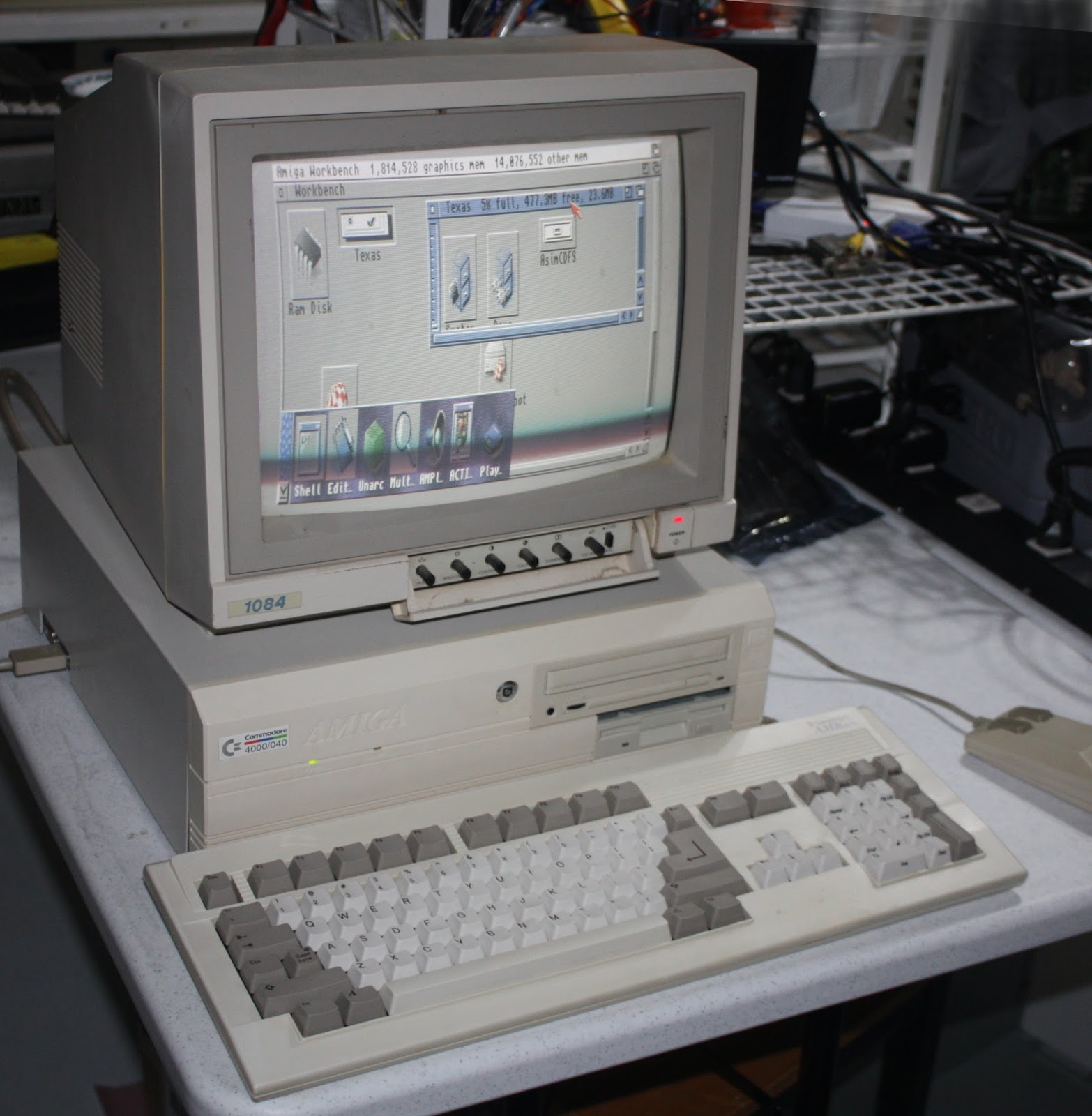
This Amiga 4000 /040 got a fresh install of AmigaOS 3.9. It deserved it.
But most of them I was just happy to see still kicking after all these years, such as this Commodore PC10-III, which was one of my first Commodore PCs. I remember using it for many years as a 64NET server for the 8-bits. Later it got PC-GEOS installed on it for productivity use.
It's good to know these computers will be safe and secure for years of new joys to come.
The final computer to receive attention, out of the dozens and dozens, was this plain Jane Amiga 500 with an A501 memory expansion in its "belly". The A501 provides this computer with an addition 512k of memory, as well as a real-time battery-backed clock. However, that aforementioned battery was a leaky Ni-Cd barrel that needed cutting out and replacing, which I did.
All of the computers which required a battery replacement received ordinary lithium-ion "coin" batteries. This represented a trade-off. These batteries are not rechargeable, but they are easy to swap, since I always mounted a battery-holder for them, and they do not leak acids or bases over time, but simply fade into oblivion.
Safer computers was not the only thing I had to show for having done this project, however. Since these computers were coming down from high shelves in some cases, being tested, and often disassembled to get to the motherboards, I took pictures. Lots and lots of pictures.
A few also required repair, such as the Amiga 600 in the above picture.
Others got their hard drives reformatted for a fresh install of Windows 3.1, for no reason at all. Such was the case for this Commodore Select Edition 286, with 80287 co-processor!
This Amiga 4000 /040 got a fresh install of AmigaOS 3.9. It deserved it.
But most of them I was just happy to see still kicking after all these years, such as this Commodore PC10-III, which was one of my first Commodore PCs. I remember using it for many years as a 64NET server for the 8-bits. Later it got PC-GEOS installed on it for productivity use.
It's good to know these computers will be safe and secure for years of new joys to come.
Wednesday, January 27, 2016
The Strangest Collectables
Of all the things in my collection, printers and monitors are the strangest. They serve very narrow purposes and tend to all do their tasks in about the same way. Of the two, printers are the strangest. Monitors can often be justified due to the non-standard video output of some computers, especially the RGBI of the C128, the Chroma/Lumina of the C64, and the 15khz signal from the Amigas.
Printers, however, just print. They take paper with tiny holes along the side, onto which they deposit letters by pressing a shape against a piece of cloth coated with ink. And they are all either IEEE-488, IEC, or GPIB (Parallel).
This is a Commodore 4022P IEEE-488 printer. It has enough processing power and memory to handle the IEEE-488 communication with the computer, and it prints. It does not scan. It does not fax. It has no lasers or jets of ink.
Instead it takes, as I mentioned earlier, a piece of cloth dipped in ink and rolled up in a continuous loop inside this plastic casing. Much like the printers of today, every printer takes a slightly differently shaped ribbon cartridge, allowing the manufacturers to sell the printers at a loss and make it up on all the ribbon sales.
This particular model was made for the European market, having an AC 220V power input. Inside is a step-down transformer and some sort of rectifier circuit to provide the DC current needed by the chips and paper motor inside. The data port is, as mentioned earlier, IEEE-488, meaning it was meant for either the Commodore PET, CBM or CBM-II line of computers.
Printers, however, just print. They take paper with tiny holes along the side, onto which they deposit letters by pressing a shape against a piece of cloth coated with ink. And they are all either IEEE-488, IEC, or GPIB (Parallel).
This is a Commodore 4022P IEEE-488 printer. It has enough processing power and memory to handle the IEEE-488 communication with the computer, and it prints. It does not scan. It does not fax. It has no lasers or jets of ink.
Instead it takes, as I mentioned earlier, a piece of cloth dipped in ink and rolled up in a continuous loop inside this plastic casing. Much like the printers of today, every printer takes a slightly differently shaped ribbon cartridge, allowing the manufacturers to sell the printers at a loss and make it up on all the ribbon sales.
This particular model was made for the European market, having an AC 220V power input. Inside is a step-down transformer and some sort of rectifier circuit to provide the DC current needed by the chips and paper motor inside. The data port is, as mentioned earlier, IEEE-488, meaning it was meant for either the Commodore PET, CBM or CBM-II line of computers.
Tuesday, November 24, 2015
PC Battery Redux
Commodore PC Desktops are not the only x86 computers with bios batteries I worried over recently. Without power to the BIOS ram, Commodore PC laptops lose their hardware settings and refuse to boot up. Fixing this problem became my next concern.
First up was my C286-LT and C386SX-LT. These computers were, in some ways, the easiest to replace the batteries in. The battery was a 3.6V non-rechargeable AA-sized battery. Moreover, these computers have an externally accessible battery port, which made my life much easier.
Most AAs are 1.5V, so it took awhile to get the correct ones on order. Also, the battery that was in there had the special connector lead required for the computer board already built in. And, importantly, the battery was coated in plastic to prevent shorting itself against the internal battery space. Turns out that entire space where the battery goes is grounded, so this was important. Lastly, because the battery had its own leads built in, it didn't need to fit very snugly in its place, which would become important when trying to figure out how to get a new battery in there.
The first thing I tried was soldering those wires directly to the new battery. The solder would not hold. So then I Dremel-tooled away some of the coating on the battery metal to see if I could get a better grip. I ruined a battery that way, don't try it.
Eventually I came around to what you see above. One side, for ground, hugs the batterys negative end and has a clip on which to solder the black wire. The other is actually a clip-on that fits neatly over the one of the ends of the battery space. Since the entire space is !!grounded!!, and I needed that end to hold the positive charge, I used some black electrical tape over the battery area, and then put the positive-end clip over the electrical tape.
The combination was enough for the snug fit and secure contact on the positive side. I replicated this process twice, once for the 286 and once for the 386, and now, a happy BIOS.
Next up was my 486SX-LTC.
I broke it open, perused it with my magnifying glass, and to save my life could not find anything resembling a battery. I suspect it relies on the main laptop battery for constant power, but well, time to move on.
Last up was the C325XN laptop, another 386SX 25mhz based computer.
The battery in this one was extremely inaccessible. Five screws and an hour of painful prying was required to get the top off this damn thing. And then, inside, I found a strange 4.8V rechargeable chain of batteries molded in plastic with custom wires velcroed between the hard drive and the floppy drive.
Replacing this one required purchasing numerous 1.2V rechargeable button-sized batteries. Sounds easy, right? Well, scale and dimensions aren't always mentioned in web stores. Sometimes you order a battery that looks identical to the one you want to discover it is exactly 3 times the size and weight of the one you have. <sigh> Well, it only took a month, but eventually the correct batteries arrived from China.
Pictured above is the original battery chain, after unwrapping. Below that are some spares of the new batteries from china. Those cute little nubbins on them made it possible to solder them into their own new little chain and then solder on the wire leads. At the bottom was the final produce, wrapped snugly in electrical tape to help with any future leaking.
With all the laptops now safely remembering their bios settings, it was time to move on to the Amigas. A few more Commodore PC desktops will be arriving next month to the collection, which I'm sure will interrupt this process, but well, a Commie-fans work is never done!
First up was my C286-LT and C386SX-LT. These computers were, in some ways, the easiest to replace the batteries in. The battery was a 3.6V non-rechargeable AA-sized battery. Moreover, these computers have an externally accessible battery port, which made my life much easier.
Most AAs are 1.5V, so it took awhile to get the correct ones on order. Also, the battery that was in there had the special connector lead required for the computer board already built in. And, importantly, the battery was coated in plastic to prevent shorting itself against the internal battery space. Turns out that entire space where the battery goes is grounded, so this was important. Lastly, because the battery had its own leads built in, it didn't need to fit very snugly in its place, which would become important when trying to figure out how to get a new battery in there.
The first thing I tried was soldering those wires directly to the new battery. The solder would not hold. So then I Dremel-tooled away some of the coating on the battery metal to see if I could get a better grip. I ruined a battery that way, don't try it.
Eventually I came around to what you see above. One side, for ground, hugs the batterys negative end and has a clip on which to solder the black wire. The other is actually a clip-on that fits neatly over the one of the ends of the battery space. Since the entire space is !!grounded!!, and I needed that end to hold the positive charge, I used some black electrical tape over the battery area, and then put the positive-end clip over the electrical tape.
The combination was enough for the snug fit and secure contact on the positive side. I replicated this process twice, once for the 286 and once for the 386, and now, a happy BIOS.
Next up was my 486SX-LTC.
I broke it open, perused it with my magnifying glass, and to save my life could not find anything resembling a battery. I suspect it relies on the main laptop battery for constant power, but well, time to move on.
Last up was the C325XN laptop, another 386SX 25mhz based computer.
The battery in this one was extremely inaccessible. Five screws and an hour of painful prying was required to get the top off this damn thing. And then, inside, I found a strange 4.8V rechargeable chain of batteries molded in plastic with custom wires velcroed between the hard drive and the floppy drive.
Replacing this one required purchasing numerous 1.2V rechargeable button-sized batteries. Sounds easy, right? Well, scale and dimensions aren't always mentioned in web stores. Sometimes you order a battery that looks identical to the one you want to discover it is exactly 3 times the size and weight of the one you have. <sigh> Well, it only took a month, but eventually the correct batteries arrived from China.
Pictured above is the original battery chain, after unwrapping. Below that are some spares of the new batteries from china. Those cute little nubbins on them made it possible to solder them into their own new little chain and then solder on the wire leads. At the bottom was the final produce, wrapped snugly in electrical tape to help with any future leaking.
With all the laptops now safely remembering their bios settings, it was time to move on to the Amigas. A few more Commodore PC desktops will be arriving next month to the collection, which I'm sure will interrupt this process, but well, a Commie-fans work is never done!
Thursday, November 12, 2015
Rare Repair Affairs
Over the last few days I had occasion to go through a bunch of old VIC-20s from the George Page collection.
Most of them have scuffed cases, missing keys, boards covered in rust, and didn't boot at all. I figured I would go through some of them to see if I can scrounge some working parts. I also pulled out a few reference working VIC boards to do the testing against. These are pictured below.
In the course of testing the various 6560 VIC-I chips (the video chip that the computer takes its name from), I made an amusing discovery.
The discovery was that, even in the exact same board, different VIC-I chips produce different tints in their basic colors. This is something I expect from TVs and Monitors which, after all, have a Tint knob. But from a digital component deterministically manufactured? A shock! I'm sure many of you olde VIC fans already knew this, but I'm still fairly new to this computer, compared to some of the other Commodores, so it was a surprise.
Below are some of the colors I observed. ++NOTE: these images were snagged off the net for illustration purposes only...
Another amusing discovery was how resilient the VIC-I chip is. Even on the worst condition boards, where CPUs, VIAs, and ROM chips had all met their doom, not a single solitary VIC-I was defective. :)
While I was working on this, I made the sad discovery that the 6581 SID (sound) chip in my main breadbox Commodore 64 had gone silent. In my experience, when a SID goes bad, it goes All The Way BAD. And that's what happened to me. A replacement was necessary.
I have a nice selection of pull-spares in my parts cabinet, so I wasn't worried. But I decided to dig into a sealed bag of SIDs I purchased off eBay 7-8 years ago. They were sold as a group, and most appear to come from the same manufacturing batch. All the chips were pushed into a pin-protection mat, and the static-bag was still unopened. I cut the bag open and began testing them. You can still see some thermo-compound on some of them -- that's my doing; they were pristinely clean with perfectly straight pins when I opened it.
I was shocked to discover that the first chip I put in did not work correctly. I was even MORE surprised at the WAY it did not work. As I mentioned above, when a SID goes bad, it goes All The Way. But this chip was not silent, but FLAWED; it did not sound right.
Moreover, as I tested the chips one after another, I discovered that the same was true of all the chips. Each one made sound, but the wrong sounds. Some had missing voices. Some had loud noisy interference. Some had broken waveform generators. None were all the way broken, but all were flawed. I was robbed, and robbed in a way I didn't expect. Were these manufacturing defects I purchased? Pulls of flawed chips from an old repair shop? Who knows. Watch the video below to see what I found.
So, in the end, I had to dig into my working pulls, and my beloved breadbox now has its voice back.
Most of them have scuffed cases, missing keys, boards covered in rust, and didn't boot at all. I figured I would go through some of them to see if I can scrounge some working parts. I also pulled out a few reference working VIC boards to do the testing against. These are pictured below.
In the course of testing the various 6560 VIC-I chips (the video chip that the computer takes its name from), I made an amusing discovery.
The discovery was that, even in the exact same board, different VIC-I chips produce different tints in their basic colors. This is something I expect from TVs and Monitors which, after all, have a Tint knob. But from a digital component deterministically manufactured? A shock! I'm sure many of you olde VIC fans already knew this, but I'm still fairly new to this computer, compared to some of the other Commodores, so it was a surprise.
Below are some of the colors I observed. ++NOTE: these images were snagged off the net for illustration purposes only...
Another amusing discovery was how resilient the VIC-I chip is. Even on the worst condition boards, where CPUs, VIAs, and ROM chips had all met their doom, not a single solitary VIC-I was defective. :)
While I was working on this, I made the sad discovery that the 6581 SID (sound) chip in my main breadbox Commodore 64 had gone silent. In my experience, when a SID goes bad, it goes All The Way BAD. And that's what happened to me. A replacement was necessary.
I have a nice selection of pull-spares in my parts cabinet, so I wasn't worried. But I decided to dig into a sealed bag of SIDs I purchased off eBay 7-8 years ago. They were sold as a group, and most appear to come from the same manufacturing batch. All the chips were pushed into a pin-protection mat, and the static-bag was still unopened. I cut the bag open and began testing them. You can still see some thermo-compound on some of them -- that's my doing; they were pristinely clean with perfectly straight pins when I opened it.
I was shocked to discover that the first chip I put in did not work correctly. I was even MORE surprised at the WAY it did not work. As I mentioned above, when a SID goes bad, it goes All The Way. But this chip was not silent, but FLAWED; it did not sound right.
Moreover, as I tested the chips one after another, I discovered that the same was true of all the chips. Each one made sound, but the wrong sounds. Some had missing voices. Some had loud noisy interference. Some had broken waveform generators. None were all the way broken, but all were flawed. I was robbed, and robbed in a way I didn't expect. Were these manufacturing defects I purchased? Pulls of flawed chips from an old repair shop? Who knows. Watch the video below to see what I found.
So, in the end, I had to dig into my working pulls, and my beloved breadbox now has its voice back.
Tuesday, November 10, 2015
A Tour Around the Lab
While perusing the web the other day, I happened upon a beautiful panorama of Yosimite Valley and it made me wonder how those are made. Some quick googling made it seem fairly simple at first. Take lots of pictures, combine them into one huge panorama picture with an editor program, and then, for a video, clip the picture into frames and recombine them as a video.
In the end, it took something like half a dozen programs and tools, with perhaps 2 hours of combined processing time on my PC, to produce this tour around my home away from the rest of my home: My Commodore Lab:
Sunday, October 11, 2015
Look What I Found!
For various reasons, I've been poking my nose into corners of my Commodore Lab that I would not normally poke into. And the stuff I've been finding has been surprising and fun.
I wish I could say they bring back a wash of fond memories, but frankly I barely even remember where some of this stuff came from. That's OK though, surprise is a delight all its own, and it's not like I don't remember anything at all.
For one thing, in the mid 2000s, I enjoyed going to the several Commodore Expos held around North America. The ECCC in Chicago, CommVex in Vegas, and (my fav) the LUCKI Expo in Louisville were yearly excursions for my carefree slightly-younger-self. And I met some wonderful Commodore fans at those Expos, such as Jeri Ellsworth, Jens Schönfeld, Joe Torre, Robert Bernardo, Jim Brain, Eric Kudzin, Jim Butterfield, Larry Anderson, and numerous others.
Apparently, it was to one of these events that I brought a Commodore 116 and VIC-20. And to my present delight, I actually got them signed by some of their original developers.
The first one I ran across while investigating a shallow plastic crate on top of a stack of boxed computers. It was signed by Robert Russell, a former Commodore engineer. Mr. Russell took over the development of the VIC-20 project from Bob Yannes, and completed the computer design, added necessary ports, and adapted the KERNEL and BASIC roms,
Barely a week later, while investigating yet another strange plastic crate, I found two of my unboxed C-116s and my Commodore 232. One of the Commodore 116s was *also* signed, this time by Dave Haynie and Bil Herd. Although Mr. Haynie is known more for his work on the Amigas, both him and Bil Herd were engineers on the Commodore 264 series computers, which includes the 116.
Although my mission in pulling them out was to either hook them up or box them, it seems I can do neither with what are obviously show-pieces. I decided therefore to create a special shelf area exclusively for "Show Pieces" in my Commodore Lab, and put it right alongside the prototype CommodoreOne, Gold C-64, LCD Keyboard, and other wall-mounted show pieces.
It looks like this:
On the shelf, I added the Commodore thermostat, a C= Typewriter, Adding Machine, the two aforementioned computers, and some watches and camera.
I wish I could say they bring back a wash of fond memories, but frankly I barely even remember where some of this stuff came from. That's OK though, surprise is a delight all its own, and it's not like I don't remember anything at all.
For one thing, in the mid 2000s, I enjoyed going to the several Commodore Expos held around North America. The ECCC in Chicago, CommVex in Vegas, and (my fav) the LUCKI Expo in Louisville were yearly excursions for my carefree slightly-younger-self. And I met some wonderful Commodore fans at those Expos, such as Jeri Ellsworth, Jens Schönfeld, Joe Torre, Robert Bernardo, Jim Brain, Eric Kudzin, Jim Butterfield, Larry Anderson, and numerous others.
![]() |
| L->R: Eric Kudzin, Me, unknown gentleman. Photo Taken from Dick Estel's photo gallery http://www.dickestel.com/commvex06.htm |
Apparently, it was to one of these events that I brought a Commodore 116 and VIC-20. And to my present delight, I actually got them signed by some of their original developers.
The first one I ran across while investigating a shallow plastic crate on top of a stack of boxed computers. It was signed by Robert Russell, a former Commodore engineer. Mr. Russell took over the development of the VIC-20 project from Bob Yannes, and completed the computer design, added necessary ports, and adapted the KERNEL and BASIC roms,
Barely a week later, while investigating yet another strange plastic crate, I found two of my unboxed C-116s and my Commodore 232. One of the Commodore 116s was *also* signed, this time by Dave Haynie and Bil Herd. Although Mr. Haynie is known more for his work on the Amigas, both him and Bil Herd were engineers on the Commodore 264 series computers, which includes the 116.
![]() |
| L->R: Dave Haynie, Bil Herd, Robert Russell. Photo Taken from Dick Estel's photo gallery http://www.dickestel.com/commvex06.htm |
Although my mission in pulling them out was to either hook them up or box them, it seems I can do neither with what are obviously show-pieces. I decided therefore to create a special shelf area exclusively for "Show Pieces" in my Commodore Lab, and put it right alongside the prototype CommodoreOne, Gold C-64, LCD Keyboard, and other wall-mounted show pieces.
It looks like this:
On the shelf, I added the Commodore thermostat, a C= Typewriter, Adding Machine, the two aforementioned computers, and some watches and camera.
Subscribe to:
Posts (Atom)